In 2026 you hear it everywhere: dashboards are dead, reports are dead, AI agents will answer every question. Part of that is true. AI has become very good at exploring data, spotting anomalies and explaining what happened, in plain language.
But look at what still lands on the board's table every month. Look at what your auditor asks for. Look at what hundreds of branch, plant and sales managers open every Monday morning. It is a report: consistent, correct, on brand, on time, and showing each person exactly the data they are allowed to see.
Ask a CFO whether they would send an AI-generated number to the board without checking it first. The answer is no. The numbers that leave the building have to be numbers you can sign off on.
Our view is simple. AI does not make reporting obsolete. It makes it more important. The more insight an organization generates, the more it needs a reliable way to get that insight to the people who act on it.
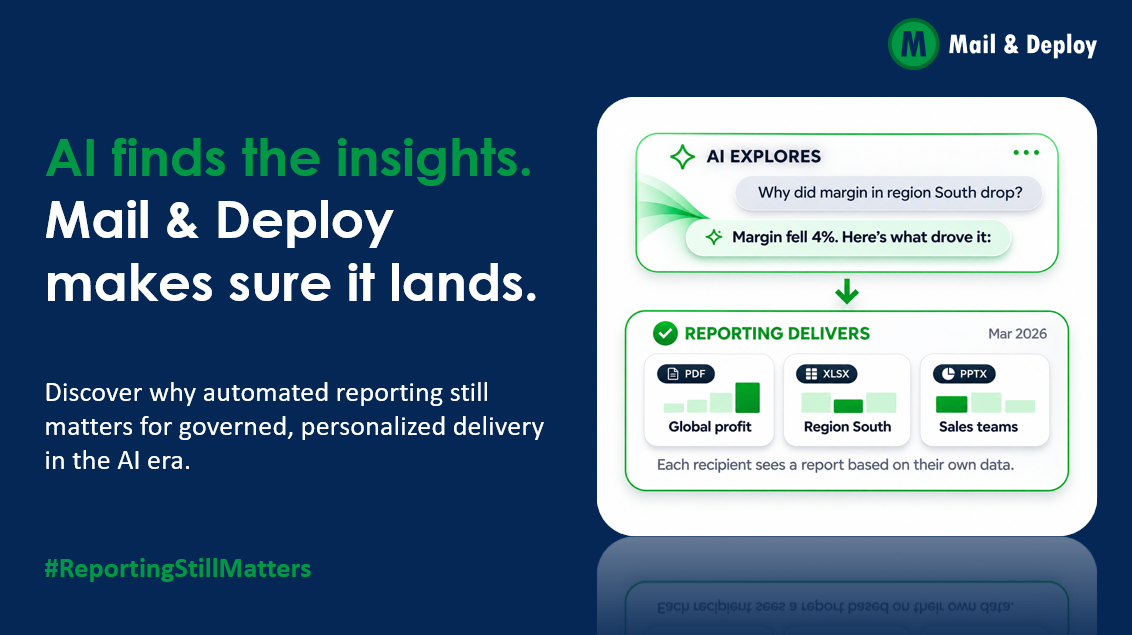
AI finds the insight. Reporting makes sure it lands.
What AI is genuinely good at in BI
Let's give AI its due. Today's BI assistants and agents, such as Qlik Answers, Copilot in Power BI, Tableau's agent or Databricks Genie, are strong at:
- Answering ad hoc questions in natural language, without anyone writing SQL.
- Spotting anomalies in large data volumes faster than any analyst.
- Explaining changes, for example why margin in one region dropped.
- Drafting commentary, turning a table of numbers into a readable summary.
This is real progress, and it changes how analysts spend their day.
Five things reporting does that AI can't (yet)
Some jobs need a different kind of tool. These five are why formal, automated reporting is not going away.
-
Being reproducible. Ask an AI the same question twice and you may get two slightly different answers. A board report or a regulatory filing must be identical when it is re-run for the auditor six months later.
-
Proving who saw what. Compliance needs to know which version went to whom, and when. That requires delivery logs and archives, not a chat history.
-
Respecting access rules at scale. Send a report to 400 managers and each one must see only their own region, cost center or customers. One mistake is a data protection incident.
-
Looking exactly right. Management packs follow a corporate design, a fixed page layout and familiar formats such as PowerPoint, Excel and PDF. That is where people present, annotate and file their numbers.
-
Showing up without being asked. Most decision-makers will never open a chat window or a dashboard. They open their inbox, Teams or a shared folder. Insight that waits to be found often is not found at all.
Better together: how AI and reporting fit
We don't see AI as competition for reporting. We see it as the best thing to happen to reporting in years. Each side does what it is best at.
| Situation | What AI does | What reporting does |
|---|---|---|
| Margin in region South drops 4% | Spots the drop and suggests causes | Puts it into the monthly management pack for the right 30 people, each seeing only their numbers |
| Monthly commentary is due | Drafts a first version of the text | Ensures it is reviewed, versioned and archived |
| An anomaly appears at 6:12 a.m. | Detects it | A regularly checked Alert sends a warning email to the responsible manager |
| The auditor asks for last March's figures | Can explain them | Reproduces the exact report that was sent, with proof of delivery |
Insight without delivery is just noise. Delivery without insight is just paper. The future of BI needs both: AI to find what matters, and reliable reporting to get it to the people who act on it.
Qlik Answers and reporting: a natural pairing
For Qlik customers, this is no longer theory. Qlik made its agentic experience generally available in Qlik Cloud in February 2026, with Qlik Answers as the conversational interface. It combines insights from the Qlik Analytics Engine with answers from curated documents, including citations and an explanation of its reasoning (Business Wire, February 10, 2026). At Qlik Connect in April 2026, Qlik added a Discovery Agent, an MCP server for third-party assistants and new agents for prediction and automation, describing the path as detect, investigate, predict and act (Business Wire via MarTech Series, April 14, 2026).
That is a strong step forward for anyone who works inside Qlik. And it makes the role of reporting clearer, not smaller:
| Qlik Answers | Mail & Deploy | |
|---|---|---|
| Mode | Pull: someone asks a question | Push: the right report arrives on its own |
| Typical user | Analysts and Qlik users exploring data | Managers, executives, partners and customers, often without a Qlik login |
| Output | A conversational answer with charts and explanation | A fixed, branded document in PowerPoint, Excel or PDF |
| Strength | Investigating why something happened | Consistency, personalization at scale and a record of what was sent |
| Deployment | Qlik Cloud | Qlik Cloud, Qlik Sense on-premises, QlikView, Power BI and SQL sources |
The two work best side by side. Qlik Answers helps an analyst find out why margins dropped in one region. Mail & Deploy makes sure that finding, and the numbers behind it, reach every regional manager in next Monday's report, each seeing only their own data.
For the many organizations still running Qlik Sense on-premises or QlikView, or moving to Qlik Cloud step by step, reporting also provides continuity: the same reports keep arriving while the platform underneath changes.
How the two work together in practice
-
From answer to alert. An analyst asks Qlik Answers why late deliveries spiked and learns they rise whenever a supplier’s lead time exceeds 10 days. Configure a Mail & Deploy Alert to check that condition regularly and send a warning email to the responsible buyers. Conditions separately control report content and distribution during a report run.
-
From a new chart to the standard report. Qlik Answers can generate new sheets and charts in an app (element61). Once a chart proves useful, Mail & Deploy adds it to the weekly report, so every recipient gets it in the layout they know.
-
From insight to the people outside Qlik. What an analyst finds with Qlik Answers reaches regional managers, partners and customers through email, Teams, SharePoint or the Mail & Deploy Hub, without a Qlik license for each recipient.
-
From agent to report run. Qlik's Automate Agent executes workflows in downstream systems (Business Wire via MarTech Series, April 14, 2026). Through the Mail & Deploy API, such a workflow can trigger a report run, for example sending a formatted investigation pack when an anomaly is flagged.
Reporting that survives your next BI change
There is a second shift happening alongside AI: BI landscapes are changing. Many organizations run Qlik and Power BI side by side, add Fabric, Snowflake or Databricks, or migrate from one platform to another over several years.
For the people receiving reports, none of this should matter. The CFO's monthly pack should look the same and arrive at the same time, whichever engine sits behind it.
That is the case for treating reporting as its own layer rather than as a feature of one BI tool:
- One design, many sources. Reports combine data from several platforms in one consistent corporate layout.
- Migration without disruption. When the BI platform changes, the reports and their recipients stay stable.
- One place for distribution rules. Who gets what, in which format, through which channel, is defined once, not rebuilt in every tool.
Where Mail & Deploy fits
Mail & Deploy is built for exactly this delivery layer. It automates the creation and distribution of reports so the right people get the right numbers, on time, every time.
- One platform, every major source. Qlik Cloud, Qlik Sense and QlikView, Power BI, Snowflake, Databricks, BigQuery, Oracle and SQL databases, combined in one report.
- High-Quality Output in the formats people actually work with: PowerPoint, Excel, Word, HTML, CSV and PDF.
- Personalized at scale. Each recipient gets their own version with only their data, and recipients don't need their own BI licenses.
- Delivered where people work. Email, file server, FTP, SharePoint and Teams, Dropbox, AWS S3, Google Drive or the Mail & Deploy Hub.
- Governed by design. Reports respect the access rules already set up in your Qlik environment, so each recipient sees only the data they are allowed to see.
- Regular alert checks. Alerts check a condition regularly and send a warning email when it is met. Conditions separately control content and distribution within a report run.
Where we're going next
Version 4 is in development. The direction is clear: AI-assisted reporting, with governed delivery. AI will help you write, build and request reports faster, and a person still reviews before anything goes out.
AI explores. Mail & Deploy delivers the numbers you sign off on.
Reporting still matters
AI raises the bar for reporting. It does not remove it. Organizations that combine AI-driven insight with reliable, automated delivery will make faster decisions and keep them auditable.
What do you think? Join the discussion on LinkedIn under #ReportingStillMatters.