 Feature Friday: Custom Calendars
Mail & Deploy supports you in taking information proactively to the right users at the right time. You can either schedule your automatic reporting distribution on a regular basis or you can add custom distribution calendars. This helps you to streamline your information delivery and to never forget to distribute your Qlik®-reports in a timely manner.
Hello again! It is #FeatureFriday!
Our reporting software for QlikView® and Qlik Sense® allows you to distribute information efficiently and consistently to the relevant decision-makers and let them know, in real-time, about changes in the numbers, especially if reports contain useful visualization features or extensions.
With the report scheduling-feature, Mail & Deploy helps you to streamline the information delivery as well as to optimize the running of many reports on your network, for example, during off-peak hours.
As already explained in #Feature Friday - Report Scheduling, you can set up automatic delivery of one or more reports to specific recipients on a regularly scheduled base. For example, if sales managers need a weekly sales report, you can automatically schedule the creation and delivery of this report for every Monday at 9:00 AM.
You are wondering now, what if the reports are not always sent with the same frequency? No problem, then you can define custom times in Mail & Deploy.
Let us take a closer look at this feature:
 Custom Calendars IconCustom Calendars
With the Custom Calender-Feature, you can define your own calendar for non-recurrent dates/times of report delivery.
For example, you have two upcoming board meeting. For these events, you have to prepare the relevant reports and send them to the board members in advance. Chances are high that you forget to send the reports in a timely manner or to manually run the task in Mail & Deploy.
So to ensure that all information is delivered on time to the right decision-makers, you can use custom calendars in Mail & Deploy and set specific dates and times.
Manage custom calendars
1. Select the Report, you want to distribute on custom times.
2. Then go to Tools > Settings > Manage Calendars.
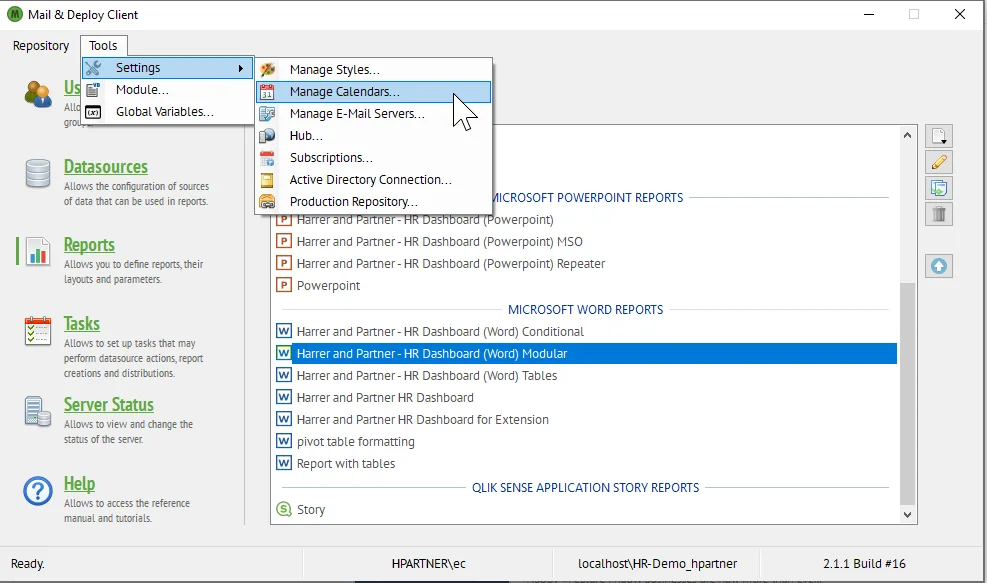 Manage Calendars in Mail & DeployManage Calendar
3. There you can create a calendar for the board meetings and add your custom times. If you know them beforehand, you can easily import them and use them in the execution plan.
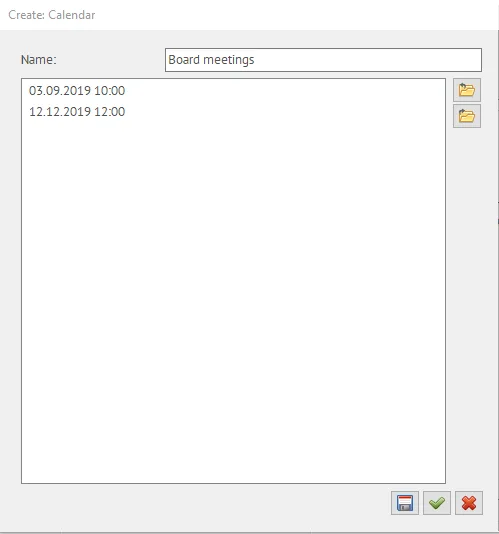 Create Calendar in Mail & DeployCreate custom Calendar
4. Then you can create an execution plan and set time zone, start/end date, maximum delay and frequency.
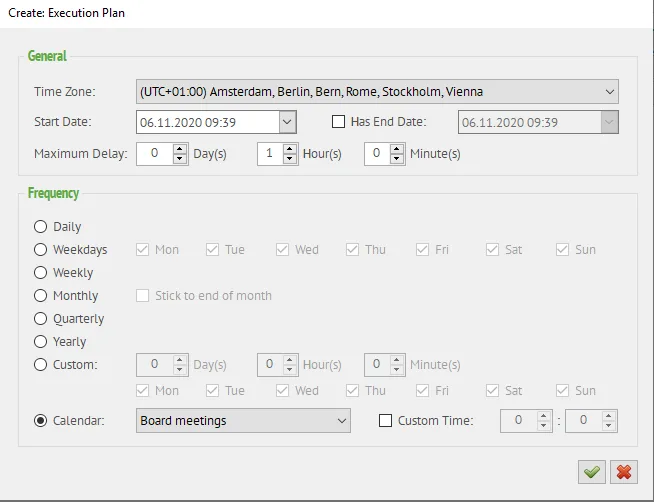 Execution Plan in Mail & DeployChoose “Calendar” as frequency
5. If you choose “Calendar” as frequency, you can select the calendar “Board meetings” that contains the date-times on which to perform your execution.
Mail & Deploy supports you in taking information proactively to the right users at the right time. You can either schedule your automatic reporting distribution on a regular basis or you can add custom distribution calendars. This helps you to streamline your information delivery and to never forget to distribute your Qlik®-reports in a timely manner.
Want to learn more about Mail & Deploy? Then visit our community!